The festive days and the snow just before Christmas made me reflect on the things I had planned to do, but lacked the time or the will to start. One of those projects was reviving my blog. Over 10 years ago, I ran a blog at diwebdeveloper.com as my personal portfolio. My intention was clear: to share the knowledge I had acquired and to learn through the process, as I am a firm believer that the best way to learn is to teach.
However, ‘life happened.’ Early on, I found I didn’t have the time or energy to keep posting. Eventually, I stopped renewing the domain, though I made sure to keep the entire installation and all its files.
Realizing now that letting it go was a mistake and since we all learn from our mistakes throughout our lives this is my attempt to fix it. I am starting again, and I don’t plan on making the same mistake twice. This is the first post on my ‘old-new’ blog, and it’s written against all odds; people don’t often read these days, opting instead to simply search for answers with AI. 😄
Beside this first new post, there are some that I initially posted on linkedin but also several very old ones like for example CSS Sprites. These techniques were common in 2014 and earlier, but they are still useful today. A great example is the ‘cursor-following eyeball’ effect that everyone is going nuts over lately, the same one Wes Bos posted about not so long ago (don’t worry I didn’t implement it, just yet 🙃).
For my new blog I’ve built a simple WordPress FSE theme called Beyond FSE, which you are free to download, modify, and use as you like, and I will probably continue to improve it when I find time. Since I’ve been ‘hooked’ on WordPress for a long time, I can’t help but to share a few reflections on the process.
First, let’s talk about FSE themes.
They are the mainstream future of WordPress, built for performance with UI/UX and speed improvements in every update. The entry point is bizarrely low, especially for a simple blogging theme where you can achieve almost everything through theme.json and a few HTML templates. I barely spent four hours on this theme. What actually gave me trouble were the small adjustments needed to get the look just right, along with choosing appropriate colors and something even harder: naming them!
Huuuh… design work is tough. Thank goodness I’m not a designer! Just look at these names I came up with: Deep Beyond, Syntax Heading, Link Vapor, and Warm Insight. That was the real challenge! 😀 Anyway, while this is a simple blog theme, it still follows contemporary WordPress development practices. It includes Webpack, OOP PHP, ITCSS principles, and SCSS mixins. It aligns with modern standards and serves as a great starting point if you want to build something more complex.
I am impressed by the current state of Full Site Editing; in just a couple of days, I was able to create a block-based theme and migrate my old data to the new site. With theme.json version 3 and latest WordPress 6.9 but even before everything is very nice and tidy.
Reduction in custom css
In my case, I have most things already defined and have added some fine-tuned CSS to various block components. I must say, however, that the reduction in custom CSS and PHP required for a theme is significant. In fact, for very simple theme, you can end up with no custom CSS at all, thanks to the power and possibility of defining so many elements through theme.json. Since most theme support functionalities are enabled by default for FSE, you might only need a minimal functions.php file or perhaps none at all.
Speed metrics
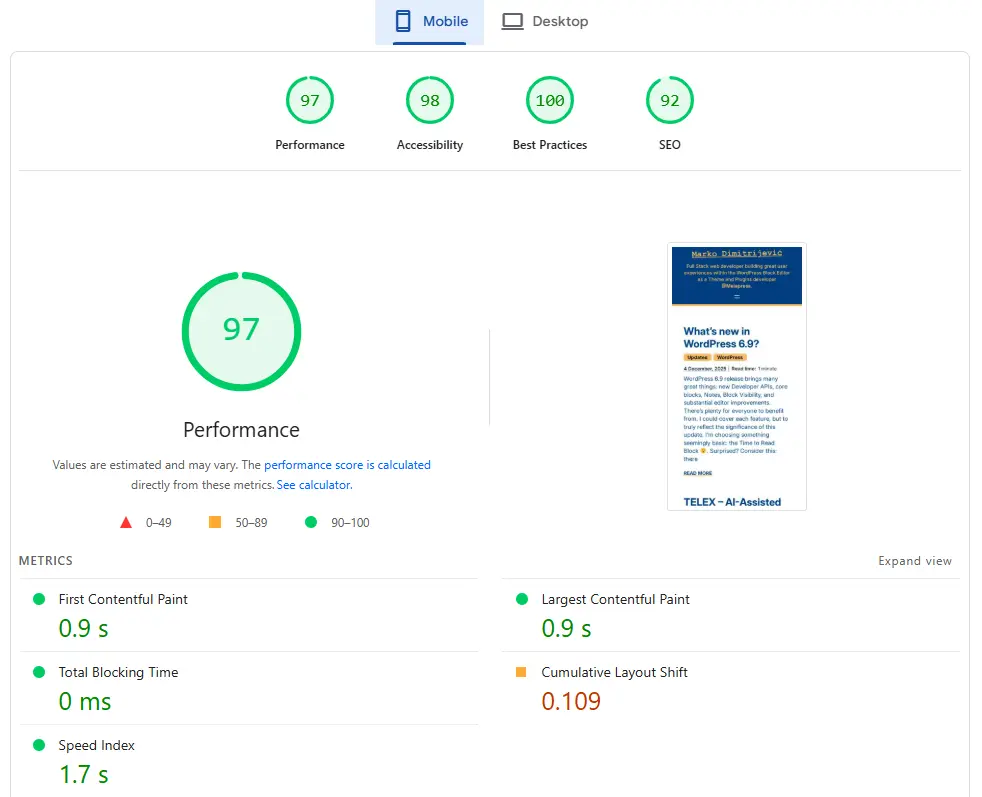
With new theme I kept a close eye on my Google Lighthouse scores. I specifically wanted to make sure that moving to blocks and reducing my custom CSS wouldn’t hurt accessibility. But actually I managed to push all my scores to 100% or right around it. What’s most impressive is that I achieved this on my original shared hosting plan without any extra caching or performance plugins. Of course I will add some later…
Side effects and pain points
Despite the obvious benefits, there are many areas where I question the approach and functionality in WordPress Full Site Editing.
Menu assignment
In classic themes, all created menus remain available when a user switches to another theme. However, I don’t see how menus registered through the Site Editor would persist, though I haven’t tested that yet.
Another more concerning issue involves the header template part. When we create a header that is initially empty, how will the theme receive updates if the user has already saved modifications to it? Once a modified version of the header is saved to the database, that version is loaded instead of the theme file. This certainly can be handled, but in classic themes, it was much simpler: you just saved the menu to the proper menu location.
Changing properties
Considering that many variables such as spacing, font families, and font sizes, become available once registered in theme.json, let’s take a single color as an example:
"palette": [
        {
          "color": "#020E20",
          "name": "Deep Beyond",
          "slug": "deep-beyond"
        }
      ]
In this scenario, the color is accessed via the CSS variable var(--wp--preset--color--deep-beyond). Since it is a variable, it is easy to adjust its value if we need a lighter or darker variant. However, what happens when we want to replace it with a newly introduced color? Even if we haven’t used it in the theme’s custom CSS, we may have configured elements to use that color within the theme templates. Since these are HTML files, they usually contain references to that variable in the block attributes (comments). This would mean manually editing every single template to update the value – ouch.
More common scenario is switching to another FSE theme which would mean that deep-beyond color doesn’t exist anymore. Of course you can easily define it again, but when you want to start from clean slate you don’t need trails from your old theme. This would mean that you need to create SQL queries to replace them with new colors or to remove them or to use some search and replace plugin and color for example can exist as following:
'"backgroundColor":"deep-beyond"'
'has-deep-beyond-background-color'
'"textColor":"deep-beyond"'
'has-deep-beyond-color'
'"borderColor":"deep-beyond"'
'has-deep-beyond-border-color'
and doing replacements only for all the colors is really painful – double ouch.🙄
Luckily no one is thinking about this when they launch fresh new site.
Takeaway
In summarizing this experience, I am very satisfied with the Full Site Editing (FSE) experience and the current state of the platform. The most crucial features are stable, and I am comfortable with this new way of creating themes. However, I am under the impression that by lowering the required coding knowledge toward a ‘no-code’ approach, this change is specifically suited for a vast number of new, likely younger, users who prefer a nearly instant turnaround. For us who are deep in code I don’t think that it will be any easier than before. 😅