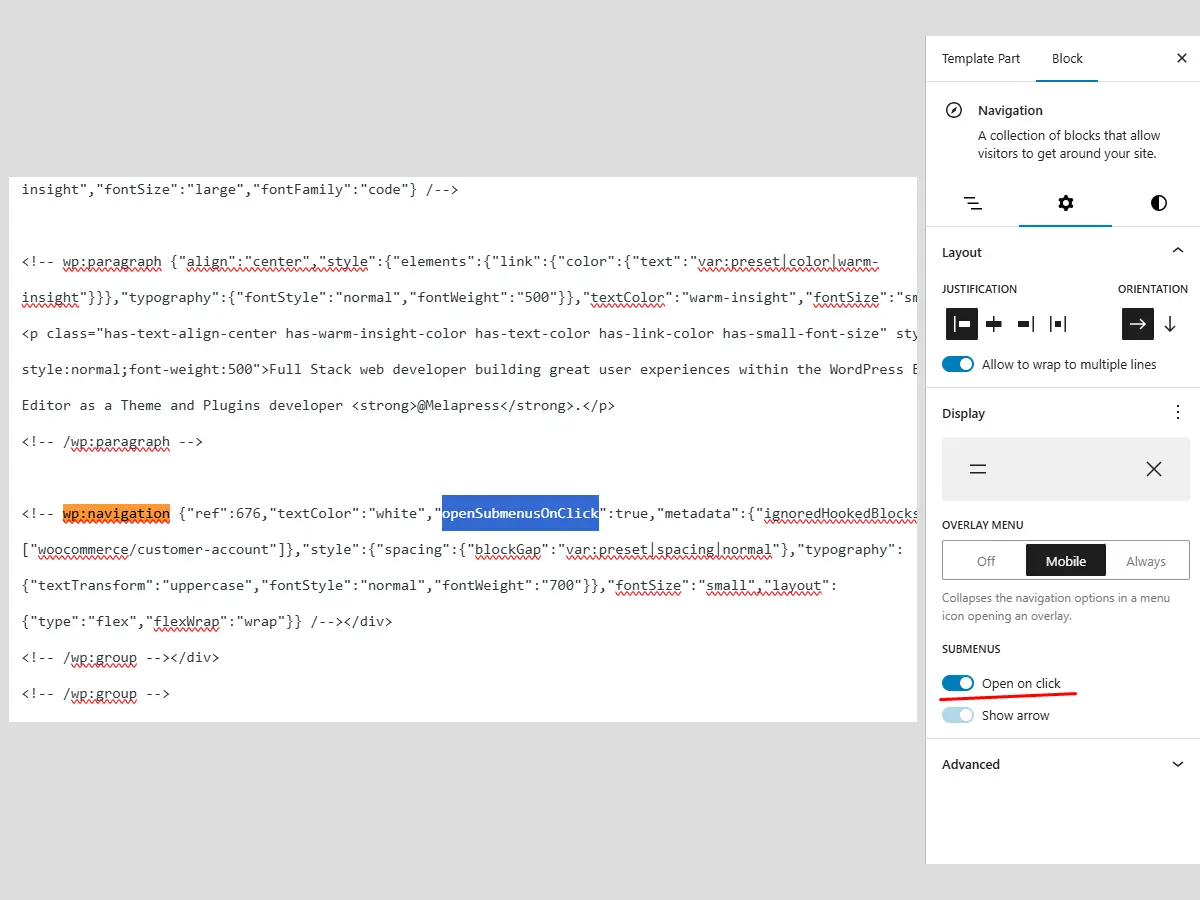
The WordPress Navigation block is accessible and well-structured. I tend to use it out of the box, extending its functionality as needed, but the behavior of submenu items feels a little odd to me. As you probably know, when a submenu is added, a new option appears: ‘Submenus – Open on click’, which is disabled by default.
In its default state, the submenu opens when a user hovers over the parent item. However, on mobile, the behavior is a bit strange: it opens on touch (the mobile equivalent of hover), but you can’t close it without tapping elsewhere. This is where the ‘Open on click’ option comes in. By enabling it, the mobile menu responds to taps, allowing users to toggle it open and closed – which is much better.
The Problem?
The issue is that this behavior also applies to the desktop version, meaning users have to click the parent menu item to open it, which I find strange. I might just be used to the ‘common’ behavior seen on most other websites, but I really couldn’t bring myself to live with it this way 🙄.
The Solution!
If you are old-school like me 😅 and want to fix this, the only thing we need to do is remove the open-on-click CSS class from menu items that contain submenus (those with the has-child class) below 1024px – which is the default navigation breakpoint, and add it back again above 1024px. Enough rambling; I understand code much better than written English, so here is the JavaScript that solves it:
// Initialize
document.addEventListener('DOMContentLoaded', function() {
    // Initial adjustment
    adjustCoreNavigationBehavior();

    // Adjust on window resize with debouncing
    window.addEventListener('resize', debounce(adjustCoreNavigationBehavior, 250));
});

/**
 * Debounce utility function to limit how often a function can be called
 * @param {Function} func - The function to debounce
 * @param {number} wait - The wait time in milliseconds
 * @returns {Function} - The debounced function
 */
function debounce(func, wait) {
    let timeout;
    return function executedFunction(...args) {
        const later = () => {
            clearTimeout(timeout);
            func(...args);
        };
        clearTimeout(timeout);
        timeout = setTimeout(later, wait);
    };
}

/**
 * Adjust navigation behavior based on screen size and when Open on click toogle enabled
 * - On desktop (>1024px): Remove 'open-on-click' class to enable hover behavior
 * - On mobile (≤1024px): Add 'open-on-click' class to maintain click behavior
 */
function adjustCoreNavigationBehavior() {
    const isDesktop = window.innerWidth > 1024;
    const navItems = document.querySelectorAll('.wp-block-navigation .has-child');

    navItems.forEach(item => {
        if (isDesktop) {
            // On desktop: remove open-on-click to allow hover behavior
            item.classList.remove('open-on-click');
        } else {
            // On mobile: ensure open-on-click is present for click behavior
            item.classList.add('open-on-click');
        }
    });
}
I’ve included a debounce utility function to keep things neat. Of course, since the default breakpoint can be changed, you should update the isDesktop constant to match the specific breakpoint you are using.
Note: my assumption is that your theme is utilizing required css for mobile sub menu behavior which is aria-expanded="false" and aria-expanded="true" on button element responsible for interaction within parent menu item, according to which you are hiding/showing sub menu items which I won’t cover here but it is worth mentioning that without that part script will simply open sub menu items on larger screens on hover.
Refining the Implementation
In the WordPress ecosystem, polluting the global window object is a common cause of conflicts between plugins. Since this is an easy fix, I’ll provide refactored code that follows best practices for a real-world project. Using an IIFE (Immediately Invoked Function Expression) combined with a Namespace Object is the industry standard for WordPress development. It keeps your functions private while exposing only what is necessary under a unique prefix. Below is the refactored code:
(function() {
    'use strict';

    /**
     * Create a namespace for the object.
     * Replace 'coreNavSubmenuBehavior' with your desired prefix.
     */
    const coreNavSubmenuBehavior = {

        /**
         * Initialize the navigation logic
         */
        init: function() {
            // Run on load
            this.adjustBehavior();

            // Run on resize with debouncing
            window.addEventListener('resize', this.debounce(() => {
                this.adjustBehavior();
            }, 250));
        },

        /**
         * Adjust navigation behavior based on screen size
         */
        adjustBehavior: function() {
            const isDesktop = window.innerWidth > 1024;
            const navItems = document.querySelectorAll('.wp-block-navigation .has-child');

            navItems.forEach(item => {
                if (isDesktop) {
                    item.classList.remove('open-on-click');
                } else {
                    item.classList.add('open-on-click');
                }
            });
        },

        /**
         * Utility: Debounce
         */
        debounce: function(func, wait) {
            let timeout;
            return function(...args) {
                const later = () => {
                    clearTimeout(timeout);
                    func(...args);
                };
                clearTimeout(timeout);
                timeout = setTimeout(later, wait);
            };
        }
    };

    // Fire it off when DOM is ready
    document.addEventListener('DOMContentLoaded', () => {
        coreNavSubmenuBehavior.init();
    });

    /**
     * Expose the object to global scope only if you need to call it from other scripts.
     * Otherwise, keep it private inside the IIFE.
     */
    // window.coreNavSubmenuBehavior = coreNavSubmenuBehavior;
})();
Because I don’t want you to implement this in a vague way – like through a code snippet plugin, I have prepared everything as a standalone WordPress plugin. You can download it from the repository on my GitHub account.